















TakeControl vs. Tricount: which one fits your everyday expenses?
Compare TakeControl and Tricount across pricing, free limits, currencies, offline use, automation, and everyday experience to find the right expense-splitting app.
TakeControl or Tricount? We compared pricing, limits, currencies, offline access, automation, and the overall experience to help you choose the app that best matches the way you split expenses.
If you have searched for an app to split travel costs, household bills, or expenses with a partner or friends, you have probably come across Tricount.
It is one of the largest apps in the category. The official Tricount listing on Google Play reports more than 17 million users and over 10 million Android downloads. Its biggest advantage is hard to overlook: Tricount presents itself as free with no limits.
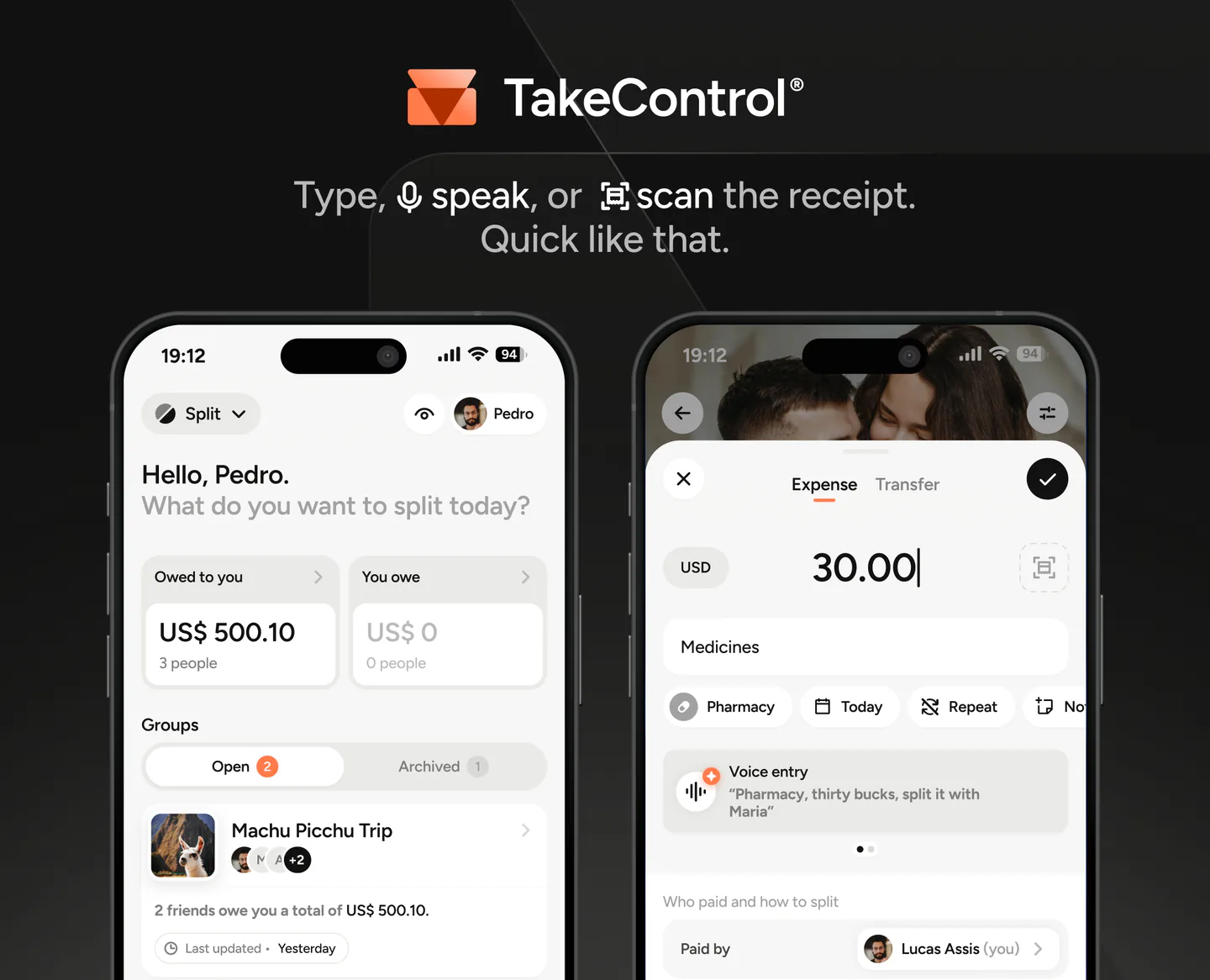
TakeControl takes a different approach. It also offers a free plan, but focuses on a more complete experience with AI, voice entry, automatic receipt scanning, budgets, recurring and installment expenses, widgets, customization, and other organization tools.
So which one should you choose?
The quick comparison
| Feature | TakeControl | Tricount |
|---|---|---|
| Pricing | Free + PRO | Free |
| Expenses on the free plan | 8 per day | Unlimited |
| Free groups | Up to 6 | Unlimited |
| Works offline | Yes | Yes |
| Custom splits | Yes | Yes |
| Debt simplification | Yes | Yes |
| Multiple currencies | Yes | Yes |
| Automatic currency conversion | PRO | Yes |
| Voice entry | Yes, with AI | No |
| Automatic receipt scanning | Yes, with OCR | No |
| Receipt photos | Yes | Yes |
| Group budgets | Yes | No |
| Recurring and installment expenses | Yes | No |
| Edit history | Yes | Not found |
| Widgets | Yes | Not found |
| Custom categories and subcategories | Yes | More limited |
| CSV export | Yes | Not directly available |
| Splitwise import | Yes | Yes |
TakeControl’s free plan allows up to 8 entries per day and 6 groups, while voice entry and receipt scanning each include four free uses; after that, they require the PRO plan.
Why is Tricount free?
This is where an important difference between the two products appears.
Tricount was acquired by European digital bank bunq in 2022. Since then, the app has become part of bunq’s broader financial ecosystem.
In 2024, Tricount introduced a redesigned app centered partly around a free bunq card. Purchases made with the card can be added automatically to a Tricount group, and people who sign up for the card also receive a bunq account.
That helps explain the current business model: the expense-splitting app can remain free while also introducing users to other bunq financial products.
There is nothing inherently wrong with that. In fact, the integration can be genuinely useful if you live in a country where the card is available.
The tradeoff is that the product also changed during that transition.
When the old Tricount Premium plan was discontinued, several features disappeared. Tricount’s own Help Center confirms that CSV/PDF exports and the former personal mode were removed. Statistics and saved custom splits were also taken out during the transition, with their return either announced or planned by the company.
The redesign prompted complaints from some long-time users in the app stores, particularly from people who relied on features that were no longer available.
There is another limitation: the card is not available worldwide. Tricount’s official eligibility list covers selected European countries and the United Kingdom. Users in the United States, for example, cannot take advantage of this integration.
You still get a capable free expense-splitting app, but an important part of its current product strategy may not be available where you live.
Where Tricount has the advantage
Its biggest strength is straightforward:
Free and unlimited
Tricount does not require a subscription to unlock more expenses. You can create tricounts and add expenses without a fixed limit.
If all you need is to:
- create a group;
- record expenses;
- split the amounts;
- see who owes whom;
it is a very strong option.
Tricount also includes features such as currency conversion, offline access, a calculator, statistics, and Splitwise import at no charge.
If you want the essentials and do not want to pay for an expense-splitting app, Tricount makes a lot of sense.
Where TakeControl stands apart
TakeControl’s approach starts where Tricount keeps things simpler.
Less work when adding expenses
In TakeControl, you can say:
“Groceries, $180, split it between me, John, and Ana.”
The AI interprets the sentence and prepares the expense.
You can also photograph a receipt and let the app identify details such as the merchant, total, and date automatically.
Tricount lets you attach receipt photos to expenses, but they work as supporting records. We could not find an equivalent OCR feature that fills in the expense automatically.
More tools for everyday use
TakeControl goes beyond showing who owes whom.
You can create:
- recurring expenses, such as rent or internet;
- installment purchases;
- daily, monthly, or total budgets for each group;
- custom categories and subcategories;
- default splits for each group;
- expenses with multiple payers.
These differences become especially useful for couples, roommates, and anyone who keeps the same group active all year, rather than only using an app during a trip.
More control and customization
TakeControl also lets you review an expense’s edit history, use home-screen widgets, and organize groups with their own categories, icons, and settings.
Tricount offers a simpler level of visual customization, currently centered mostly around elements such as emojis.
It is a difference in philosophy.
Tricount aims to keep the experience simple.
TakeControl aims to offer more tools without turning shared expenses into a spreadsheet.
Which one offers the better experience?
That part is subjective.
Tricount has a simple interface and handles the basics of expense splitting quickly.
TakeControl is a newer app with a strong focus on the day-to-day experience: speed, offline support, animations, visual hierarchy, customization, and several ways to add an expense.
Voice entry, OCR, the built-in calculator, widgets, and automations also reduce the number of steps involved in regular use.
That may not matter much if you only record a few expenses.
If you open the app constantly, it starts to matter a lot.
So, TakeControl or Tricount?
Choose Tricount if:
- your priority is unlimited expenses and groups for free;
- you want a straightforward option for trips or occasional splitting;
- free currency conversion matters to you;
- you live in a country where the integrated bunq card is available;
- you do not need advanced automation or organization tools.
Choose TakeControl if:
- you want a more complete and customizable experience;
- you plan to use the app continuously with a partner, friends, or roommates;
- you want to add expenses by voice;
- you want to scan receipts and extract their details automatically;
- you use recurring or installment expenses;
- you want to manage a group budget;
- you value widgets, edit history, and more organization options.
The core difference is simple:
Tricount is hard to beat if your top priority is a free, unlimited experience.
TakeControl is for people who want to go beyond the basics with a more complete, modern, and automated way to manage shared expenses.
Try TakeControl
TakeControl is available for free on iOS and Android.
You can create groups, try the main features, and decide for yourself which experience fits you better.
If you already use Splitwise, you can import your groups and expense history instead of starting over. You can also compare every feature in the Free and TakeControl PRO plans.
Download TakeControl for free and organize your shared expenses.
 Download for iPhone
 Download for Android

I created TakeControl to make splitting expenses between couples and on trips simpler. Here, I share tips, app updates, lessons learned, and content to make managing shared expenses easier.
Frequently asked questions
Yes. Tricount currently presents itself as free with no limits. TakeControl has a free plan with up to 8 entries per day and 6 groups, plus TakeControl PRO for higher limits and additional features.
Yes. Both apps let you add expenses without an internet connection and sync the information later.
Yes. Both let you record expenses in different currencies. Tricount includes automatic currency conversion for free, while automatic conversion is part of TakeControl PRO.
Tricount is particularly appealing if you want unlimited expenses and free currency conversion. TakeControl adds trip budgets, voice entry, receipt OCR, widgets, and more customization.
Both work for couples, but TakeControl includes features designed for ongoing use, such as recurring and installment expenses, monthly budgets, custom categories, and an edit history.
