















Payments are easy to lose track of
Groceries, rent, takeout and subscriptions add up. Later, neither of you remembers who paid for what.
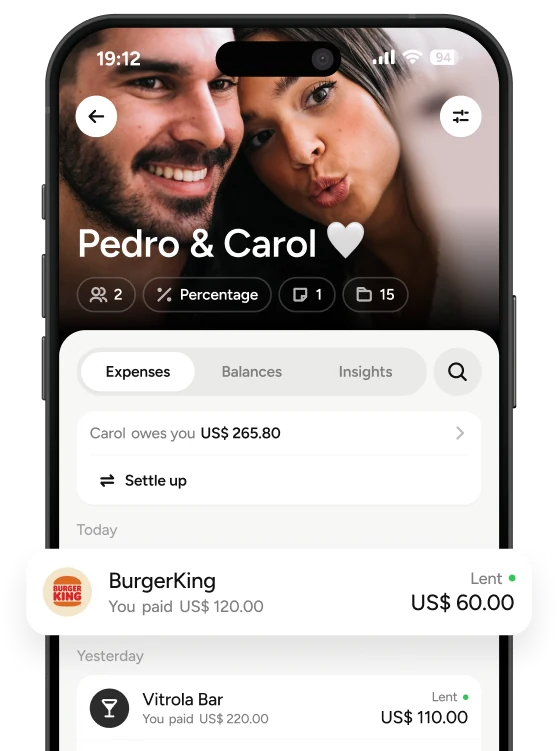
Add your expenses, agree on a fair split and see your shared balance. TakeControl does the math.
Free to get started · iOS and Android

One of you bought groceries. The other paid rent. In a 2025 Intuit Credit Karma survey, 28% of couples said they fight about money at least once a month. Without a shared record, by month’s end it is hard to remember who covered what.
Groceries, rent, takeout and subscriptions add up. Later, neither of you remembers who paid for what.
When your incomes differ, splitting everything equally can put more pressure on one person.
Without a shared record, settling up means searching messages and relying on memory.
Three steps to keep the money admin from falling on one person.
Add your partner. Keep household expenses separate from trips and other groups.
Choose who paid and how to split it: equally, by percentage or by exact amount.
TakeControl keeps your balance up to date, so you always know where things stand.
Equal shares, income-based percentages or exact amounts. You can choose the rule that makes sense for each expense.
Rent, groceries, subscriptions and nights out, all organized in one place.
Add rent, utilities and subscriptions once. The app repeats them each month.
Set a daily, monthly or total limit and see how much is left.
Send a friendly reminder to settle up without turning your messages into a bill collector.
The widget shows your balance and budget without opening the app.
Find expenses, notes and changes without digging through old chats.
Add an expense with no signal. It syncs when you reconnect.
A spreadsheet can work, but someone has to maintain the formulas and check the totals. TakeControl updates your balance as you add expenses.
It works, but takes work.
| Date | Expense | Amount | Split |
|---|---|---|---|
| 01/03 | Groceries | $180 | =C2/2 |
| 05/03 | Internet | $120 | =C3*60% |
| 10/03 | Rent | $2,000 | =C4*60% |
Your balance takes care of itself.
Download for free and set up your group today.
From the first date to the household bills: see how to handle money in each situation.

Who pays for the first date and when to start splitting the bill.

The pros and cons of each setup and how to choose what works for you.

How to split bills when one of you does not know what next month will bring.

When adding your partner to your card helps and when separate cards are better.

One shared emergency fund or one each.

Insurance, car registration and other yearly bills: how to plan for them together.
Straight answers to help you agree on a split and get started.
TakeControl is built for shared expenses. Split costs equally, by percentage or by exact amount, with an automatic balance and a shared history. The best choice is one that fits your agreement and is easy enough to use every day.
Yes. Set each person’s percentage, such as 60% and 40%, and the app applies it to shared expenses. You can choose a different rule for a specific expense.
No. You can keep your own accounts and cards. TakeControl does not connect to your bank: add the expense and the app calculates your balance.
Any shared expense, including rent, groceries, internet, subscriptions, takeout, nights out and trips. For vacations, you can create a separate group and split your travel expenses without mixing them into your monthly bills. Personal purchases can stay out of the group.
Create a group for your home and add rent, utilities and internet as recurring expenses. The security deposit, movers and furniture go in as one-off or installment purchases. Read our guide on how to split bills when living together.
Keep everything in your couples group or create a separate group for baby expenses. Each group has its own balance. Read our guide to getting your finances ready for a baby.
You can get started for free. TakeControl PRO adds more features.
Open your couples group to see the current balance. Once you settle up, record the payment in the app to update it.